 spidee
An online quote request form lets a customer ask you for a price without a phone call. The better ones work like an online shop: the customer picks services from a list, sees a total (or "price on request" for jobs you need to look at first) and sends the request. You get every detail in one email, with a PDF attached. This guide shows how that works for a cleaning business, then for catering, hire, gardening, trades and car detailing.
Why getting a quote is still slow
Most small business websites ask for a quote in one of two ways. There is a phone number, which means phone tag when you are on a job. Or there is a contact form with a single "message" box, which means the customer writes "how much for a clean?" and you write back asking how big the house is, which rooms, how often and when.
Each round of emails can cost a day. Some customers give up and ask someone else. And when the details finally arrive, they are spread across three emails and a text.
The shop-style online quote request form: pick, see a total, send
A shop-style quote form flips this around. Instead of a blank box, the customer sees your services as a list, the way they would see products in an online shop.
- Pick from a list. They tick the services they want and choose a rough size or quantity for each.
- See a running total, or "price on request". Items with a set price add up as they go. Items you need to quote show "price on request" instead.
- Send the request. They add their contact details, an optional purchase order number and, if it helps, a few photos, then press send.
Nothing is charged online. It is a request, and you still confirm the price and the date. The difference is that it arrives complete.
Online quote forms by industry
Cleaning quote form: a worked example
Cleaning is a good fit because most jobs are a mix of standard services and things that vary. Here is an example quote form for a made-up cleaning business.
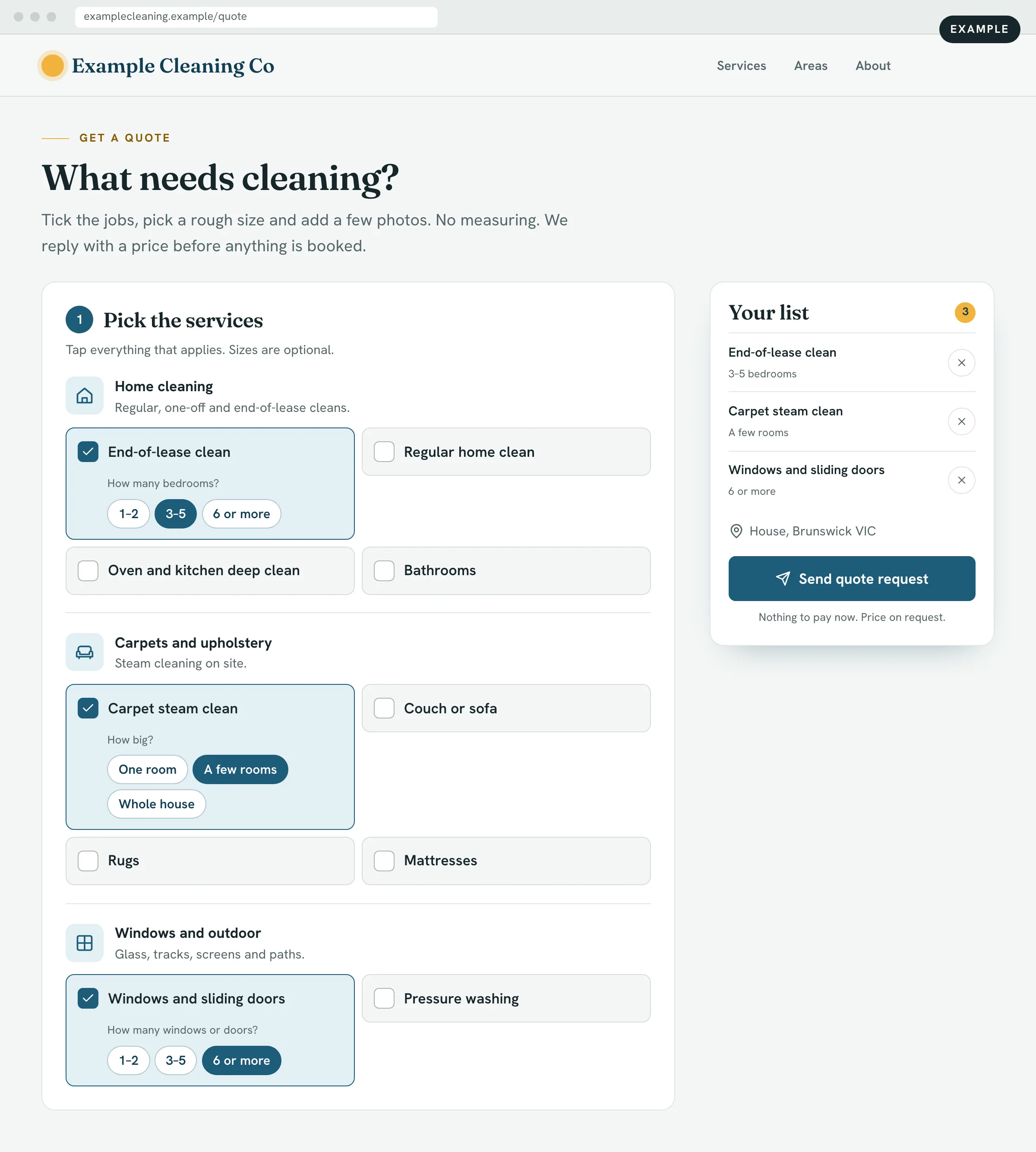
The customer chooses the type of clean, then a rough size: how many bedrooms, how many rooms of carpet, how many windows and sliding doors. Add-ons like an oven or windows sit on the same list. Each item shows a price if you have a set one, or "price on request" if it depends on the state of the place.
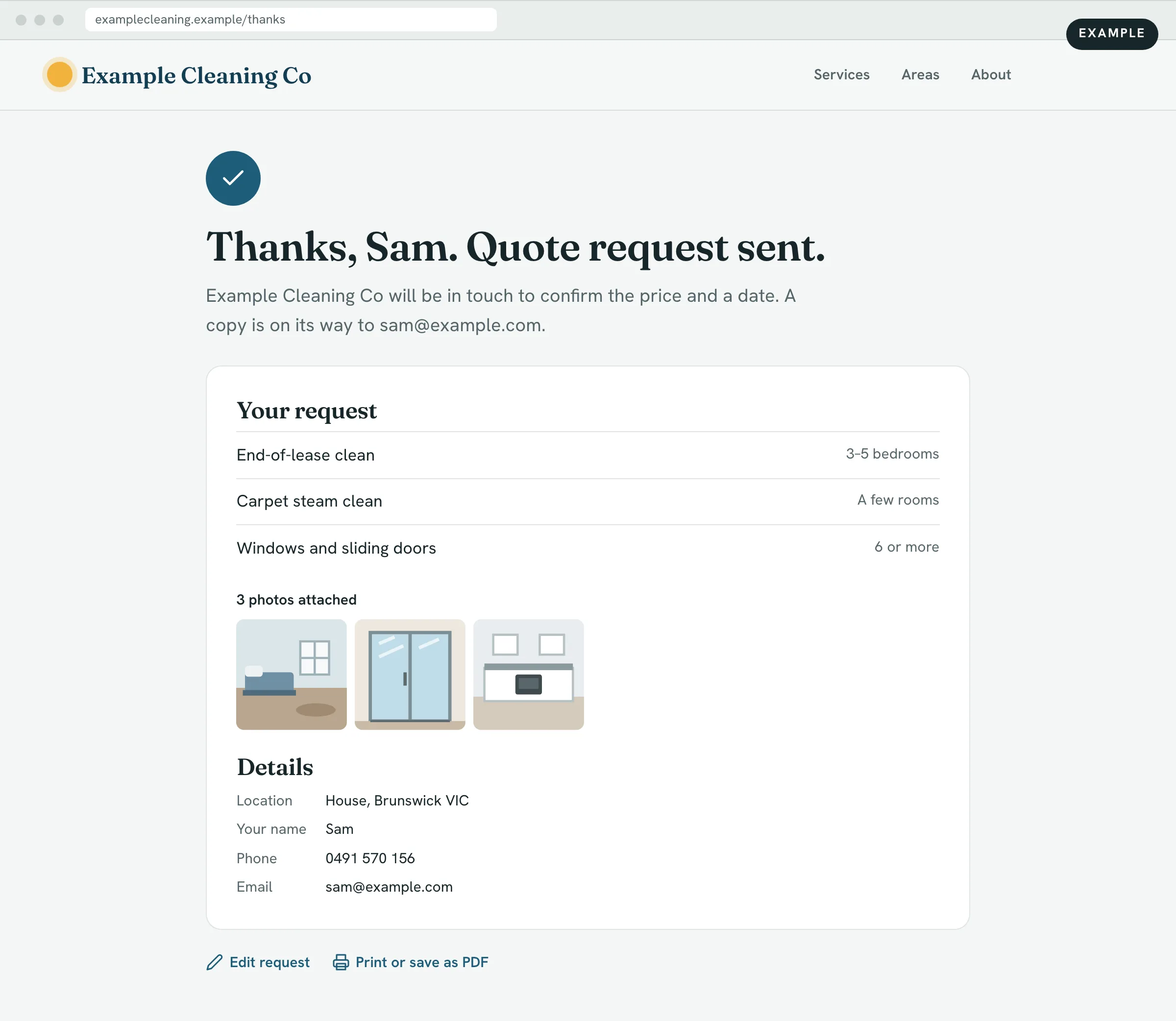
When they send it, they can get a copy of what they asked for, with their photos and contact details, so they know exactly what you received.
The same pattern works for other businesses. Here is how it would look for each.
Catering order form online
| What customers pick | Platters, lunches and morning tea items, with a quantity for each |
|---|---|
| What changes the price | Number of people, items chosen, delivery |
| Price shown or quoted | Usually shown, with a running total. A purchase order number field suits office orders. |
Event and equipment hire quotes
| What customers pick | Items to hire and how many of each |
|---|---|
| What changes the price | Quantity, how long they keep it, delivery and setup |
| Price shown or quoted | Shown per item. Delivery and setup on request, since they depend on the venue. |
Gardening and landscaping quotes
| What customers pick | Mowing, hedging, garden clean-ups, green waste removal |
|---|---|
| What changes the price | Size of the yard, how overgrown it is, access |
| Price shown or quoted | Regular mowing can show a price. Clean-ups and landscaping are usually on request, with photos. |
Trades and handyman quote requests
| What customers pick | Common jobs from a list, such as hanging doors, patching walls or fitting shelves |
|---|---|
| What changes the price | Number of items, materials, access |
| Price shown or quoted | Mostly price on request. Photos can save a site visit for small jobs. |
Car detailing packages and add-ons
| What customers pick | A package, then add-ons such as interior shampoo or paint protection |
|---|---|
| What changes the price | Size of the vehicle, its condition, the add-ons |
| Price shown or quoted | Packages shown, with a total. Heavy cleaning or paint work on request. |
Show prices or "price on request"?
You do not have to choose one or the other. The middle path works well for most service businesses:
- Show a price for jobs that are the same every time, like a standard package or a single item. Customers like knowing where they stand, and it filters out people looking for something you do not offer.
- Use "price on request" for jobs that depend on size, condition or access. The customer can still pick the job and describe it, so your quote is based on real details rather than a guess.
For a cleaner, that might mean a set price for a regular clean and "price on request" for an end-of-lease clean or carpets. Both sit on the same list.
What a good online quote request form sends you
The point of the form is what lands in your inbox. A good request gives you:
- One email with everything. Every item, size or quantity, and the customer's contact details, laid out in one place.
- A PDF attached. Something you can file, print or forward to whoever does the pricing or the accounts.
- A copy for the customer. They can get a copy of what they sent, so nobody has to ring to check.
- A purchase order number when the customer is a business, a school or a government office.
- Photos, if they chose to add them. Sometimes enough to price a job without a visit.
One wording tip: label the button "Request a quote" or "Send request", not "Add to quote" or "Buy". People know what a shopping cart does, and wording that sounds like a checkout can make them think they are about to pay.
How to set up a quote request form on your website
- List what you sell. Write down the services or items customers ask about most, grouped the way you would explain them on the phone.
- Decide what changes the price. Bedrooms, people, hours, square metres, vehicle size. That becomes the rough size customers pick.
- Mark each item. A set price, or "price on request".
- Decide what you need to know. Suburb, preferred date, contact details, photos, purchase order number. Keep the rest optional.
- Put it where people look. A clear "Request a quote" button on every page, not just a contact page.
If you are still working out your website as a whole, our guides to what a small business website costs in Australia and the best AI website builders in Australia cover the bigger picture.
Spidee builds this for you. See how quotes and orders on your website work, or talk to us about what you sell.
Online quote form FAQ
Should I put prices on my cleaning business website or ask people to request a quote?
You can do both on the same form. Show a set price for jobs that are the same every time, and "price on request" for jobs that depend on the size or state of the place. Customers still pick what they need, and you send the price once you have seen the request.
What should a quote request form on my website ask for?
The services they want with a rough size for each, the suburb or address, when they would like it done, and their name, phone and email. Add a field for a purchase order number if you work for businesses, and let people attach photos if they help you price the job. Keep everything else optional.
Is a quote request the same as an online booking, and do customers pay upfront?
No. A quote request is the customer telling you what they want. Nothing is charged online. You check the request, then confirm the price and the date with them, the same way you do now.
Do I need quoting software like ServiceM8 or Tradify, or is a quote form on my website enough?
They mostly do different jobs. Field service software like ServiceM8 and Tradify is built mainly to help you run the work once you have it. A quote request form on your website helps you get the work in the first place, with the details already sorted. If you only need clearer requests from your website, the form may be all you need.
Want customers to send you complete quote requests? Talk to us, or read more about quotes and orders.